
2.1.2. Architectural Overview#
In this chapter we will give an architectural overview over the different pieces of SimBricks.
Currently the SimBricks architecture comprises three main parts: Frontend, Backend and Runners as shown in the figure below. In the following we will have an overview over the purpose of these pieces.
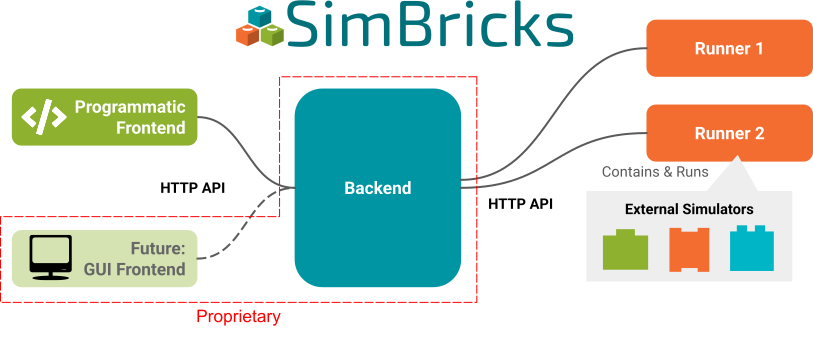
Fig. 2.2 Architectural Overview over the SimBricks Architecture#
2.1.2.1. Frontend#
Users use the SimBricks Frontend to configure virtual prototypes i.e. to define experiments and to trigger the execution of them.
Note
Orchestration Framework, CLI and Client Library are Open Source, the GUI is Closed Source.
The Frontend itself is again composed of multiple important pieces:
Python Orchestration Framework: Users configure virtual prototypes through our Python Orchestration Framework for Virtual Prototypes. This means users can write simple Python scripts using the orchestration framework to define the experiments they want to run including (but not limited to) the simulation topology, simulators and whether the simulation should be executed on multiple machines or not.
Command-Line Interface (CLI): Once the virtual prototype configurations are ready, users submit them to the backend for execution. This can be done using the SimBricks Command Line Interface (CLI) tool. Users can opt to asynchronously retrieve the output and results at a later time, or handle them synchronously as the virtual prototype runs. Besides the execution in the cloud, SimBricks also supports the local execution of virtual prototypes through the command line (see Running Virtual Prototypes).
Python Client Library: Instead of sending virtual prototype configurations via the CLI to the backend, users can use our Client Library directly within the Python scripts that define their virtual prototypes in order to send them to the backend for execution. This does also offer the flexibility to process the results conveniently through Python scripts.
Graphical User Interface (GUI): SimBricks also offers a graphical web-based frontend that enables graphical configuration of and interaction with virtual prototypes.
2.1.2.2. Backend#
Note
The Backend is Closed Source and hosted by the SimBricks organization.
The backend in SimBricks serves as the central hub for managing and executing virtual prototype simulations. Its responsibilities include:
Storing Configurations and Results: It securely retains the virtual prototype configurations submitted by users, along with the outputs and results generated during their execution, ensuring these can be retrieved at any time in the future.
Scheduling Simulations: When multiple users submit virtual prototyping configurations for execution, the backend organizes and schedules them. It determines which virtual prototypes run on which runners (execution nodes) and when, efficiently managing the available resources.
Aggregating Outputs and Results: After the execution of a virtual prototype finished, the backend collects and consolidates the outputs and results, making them accessible for either asynchronous or synchronous processing via the CLI tool or Python client library.
In essence, the backend is the operational core of SimBricks, enabling users to define, execute, and analyze their virtual prototypes seamlessly.
2.1.2.3. Runners#
Note
Runners are Open Source.
Runners are responsible for the actual execution of virtual prototypes.
Once a user submitted a virtual prototyping configuration for execution to the backend, the backend will schedule its execution on one of the runners that still has resources available.
Each runner is set up with a (set of) suitable environment(s) for the simulators it supports, and different runners can be configured differently and independently. As a result even mutually incompatible simulators can be configured through different runners that can run on shared or separate machines.
Runners can run on a user’s infrastructure or can be hosted by the SimBricks organization. They register themselves at the SimBricks Backend which manages them. Crucially, a set of runners on the same infrastructure can be shared by multiple users. All they need to do is to submit their configurations to the SimBricks Backend.
If you want to set up your own Runners with your own simulators check out the following:
Create and Setup Runners: To learn about how to create and register Runners.
Simulator Integration: To learn how Simulator Integration into SimBricks works.
Self-Hosted Setup: To install everything needed on your own machines, see Advanced Setup & Building.
2.1.2.4. Repositories and Packages#
The open-source parts of SimBricks are spread across a small set of repositories, each with a clear responsibility:
Main repository (simbricks/simbricks): the SimBricks core. It contains
lib/— the SimBricks protocol libraries in C/C++ (base, network, PCIe, memory protocols and helper libraries for adapters), distributed as thesimbricks-libpackage,dist/— proxies for distributed simulations across multiple machines (TCP sockets and RDMA), distributed as thesimbricks-distpackage,symphony/— the Python packages of the orchestration framework and the surrounding tooling:simbricks-utils,simbricks-orchestration,simbricks-runtime,simbricks-client,simbricks-telemetry,simbricks-cli,simbricks-runner, andsimbricks-local,docker/— the three SimBricks Docker images (base environment, runner, executor), see Using Pre-Built Docker Images,conda-recipes/— conda packaging for all of the above,doc/— this documentation.
Component repositories (
component-*): one repository per integrated simulator, e.g. component-qemu, component-gem5, component-ns3, component-i40e, component-corundum. Each contains the simulator sources (or a submodule of the SimBricks fork of the simulator), the SimBricks adapter, the Python integration into the orchestration framework, and conda recipes. See Packaging a Simulator as a Component Repository for the pattern.Image builder (image-builder): a small, simulator-independent packer harness that builds base Linux images and their boot artifacts (kernel, initrd, ELF
vmlinux), including the images SimBricks publishes to its image registry. Virtual prototypes build on top of such images from the script itself, which is where most image work happens — see Disk Images and Data Flow.Examples (simbricks/simbricks-examples): ready-to-run example virtual prototypes used throughout this documentation.
All packages are distributed through the SimBricks conda channel (and the Python packages additionally through PyPI) — see Installing SimBricks Packages (Conda Channel) for the complete inventory.